GNOME Evolution: compose email with Vim
- 281 words
- 2 min
GNOME Evolution configuration
In order to use an external text editor rather than the GNOME Evolution integrated editor, the external-editor plug-in is needed.
First, ensure that it is enabled in GNOME Evolution plug-in manager by ticking the check box in Edit > Plugins > External Editor.
If the plug-in is not available, you have to install it.
You can install it using apt (I strongly suppose that you are using a Debian based distribution), the plug-in is in the package evolution-plugins-experimental.
Then you should configure it using the plug-in manager so that Vim is used.
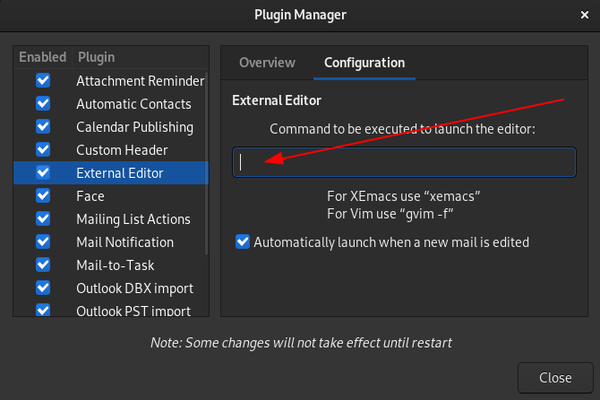
The command should invoke the editor in GUI mode using gvim -f.
Configure Vim for email composition
I use Vim as a light text editor to quickly edit a file without waiting 2 seconds for the file to open.
Then I want to keep a lightweight Vim with without overloading its configuration file for specific use cases.
The vimrc file content is as follow:
set mouse=""
set tabstop=4
set softtabstop=4
set shiftwidth=4
set expandtab
syntax on
Yet I want to use specific Vim features for email composition without making Vim launching slower for non-email-composing use cases.
Hence the addition of those lines in my vimrc file so that email composition related features are only loaded if graphical interface is used.
if has("gui_running")
    set formatoptions+=a
    set formatprg=par\ -w80q
    set guifont=Hack\ Regular\ 12
    set number
    colorscheme desert
endif
Here I tell vim to:
- automatically format text;
- format text using
par; - use the font
Hack Regular 12; - display line numbers;
- use the desert color scheme;
par is used with the w option to specify text width and the q (for quote) option to deal with nested quotation character > when formating text.