RealWorldApp - part 2
- 661 words
- 4 min
Hi,
after RealWorldApp part 1 comes part 2.
So in part 1 we defined our data model.
Now let's code it.
Creation of the project
First we fork the RealWorldApp starter kit and then we clone our fork :
git clone git@github.com:ZephOne/realworld-fastapi-htmx.git
Then lets iniate a uv project in it:
cd realworld-fastapi-htmx
uv init .
Then create our virtual environment:
uv venv
uv pip install sqlmodel
And create a directory app :
mkdir app
Models creation
Here was our data model:
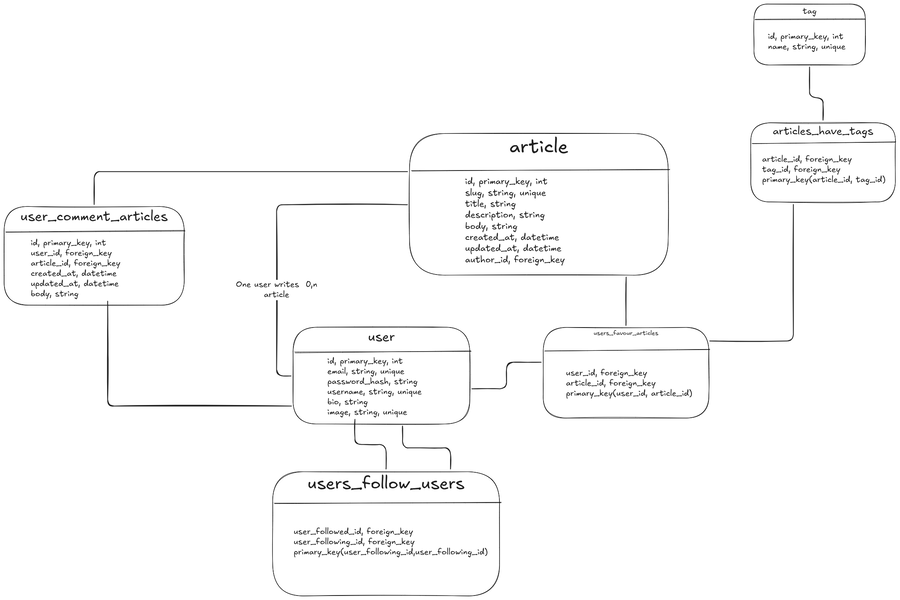
We'll use the ORM recommanded by FastAPI : SQLModel which is actually a wrapper of SQLAlchemy.
We'll define our data models in a file app/models.py.
from sqlmodel import SQLModel
User model
Let's define the class User using the classes classes pydantic.EmailStr, pydantic.FilePath, sqlmodel.Field :
class User(SQLModel, table=True):
    id: int | None = Field(default=None, primary_key=True)
    email: EmailStr = Field(unique=True, index=True, max_length=255)
    password_hash: str
    username: str = Field(unique=True, index=True, max_length=40)
    bio: str | None = None
    image: FilePath | None =  Field(default=None, unique=True)
The users follow users relationship
The model User is in a Many to Many relationship with itself, here we define this relationship:
class UsersFollowUsers(SQLModel, table=True):
    user_followed_id: int = Field(foreign_key="user.id", primary_key=True)
    user_following_id: int = Field(foreign_key="user.id", primary_key=True)
And in the class User we add the attributes followers and following by using the class sqlmodel.Relationship:
class User(SQLModel, table=True):
    id: int | None = Field(default=None, primary_key=True)
    email: EmailStr = Field(unique=True, index=True, max_length=255)
    password_hash: str
    username: str = Field(unique=True, index=True, max_length=40)
    bio: str | None = None
    image: FilePath | None =  Field(default=None, unique=True)
    followers: list["User"] = Relationship(back_populates="following", link_model=UsersFollowUsers)
    following: list["User"] = Relationship(back_populates="followers", link_model=UsersFollowUsers)
The class UsersFollowUsers has to be defined before the class User if we want to be able to reference it in the class User.
This won't work!!!
The thing is that we have a relation from the User class to the User class using the intermediary class UsersFollowUsers and in our case we need to tell the "join path".
If we want a user's followers we should use the foreign key that gives us an object of the class User.
Yes indeed. But there are two foreign keys that do that!?
- user_following_id
- user_followed_id
It must be told to the SQLAlchemy Relationship using the key-word arg foreign_keys.
Yet there is no direct link between the wrapping SQLModel Relationship to the SQLAlchemy Relationship attribute foreign_keys.
The SQLModel Relationship made the attribute sa_relationship_kwargs available for this use case.
Finally the User class is defined like this:
class User(SQLModel, table=True):
    id: int | None = Field(default=None, primary_key=True)
    email: EmailStr = Field(unique=True, index=True, max_length=255)
    password_hash: str
    username: str = Field(unique=True, index=True, max_length=40)
    bio: str | None = None
    image: FilePath | None =  Field(default=None, unique=True)
    followers: list["User"] = Relationship(
        back_populates="following",
        link_model=UsersFollowUsers,
        sa_relationship_kwargs={"foreign_keys": [UsersFollowUsers.user_followed_id]},
    )
    following: list["User"] = Relationship(
        back_populates="followers",
        link_model=UsersFollowUsers,
        sa_relationship_kwargs={"foreign_keys": [UsersFollowUsers.user_following_id]},
    )
The Article Model
Now we define the class Article using the classes classes datetime.datetime:
class Article(SQLModel, table=True):
    id: int | None = Field(default=None, primary_key=True)
    slug: str = Field(unique=True)
    title: str
    description: str
    body: str
    created_at: datetime = Field(default_factory=datetime.now)
    updated_at: datetime | None = Field(default=None)
	author_id: int = Field(foreign_key="user.id")
The option default_factory takes a Callable to define the function use to insert a value in this field.
The users favour articles relationship
The User model has a first relationship Many to Many with the model Article, defined like this:
class UsersFavourArticles(SQLModel, table=True):
    user_id: int = Field(foreign_key="user.id", primary_key=True)
    article_id: int = Field(foreign_key="article.id", primary_key=True)
The User class definition is now:
class User(SQLModel, table=True):
	# ...
    favorite_articles: list["Article"] = Relationship(back_populates="favoriting_users", link_model=UsersFavourArticles)
The Article class definition is now:
class Article(SQLModel, table=True):
    # ...
    favoriting_users: list["User"] = Relationship(back_populates="favorite_articles", link_model=UsersFavourArticles)
The users comment articles relationship
The User model has a second relationship Many to Many with the model Article.
Yet this relationship Many to Many is not a simple link, it brings other informations :
- Comment's creation date
- Comment's update date
- Comment's body
Here we don't only need to get from a user the articles he commented, but also the comments.
So "back_populates" is done on an attribute of the class UsersCommentArticles.
Concerning the relationship users favour articles, the class UserFavourArticles is only used as a link (use of the option link_model) and in this case back_populates is only done between the linked classes, i.e User and Article.
Here is the definition of this relationship.
class UsersCommentArticles(SQLModel, table=True):
    id: int = Field(primary_key=True)
    user_id: int = Field(foreign_key="user.id")
    article_id: int = Field(foreign_key="article.id")
    created_at: datetime = Field(default_factory=datetime.now)
    updated_at: datetime | None = Field(default=None)
    body: str

    commenting_user: "User" = Relationship(back_populates="commented_articles")
    commented_article: "Article" = Relationship(back_populates="commenting_users")
The User class definition is now:
class User(SQLModel, table=True):
    # ...
    commented_articles: list["UsersCommentArticles"] = Relationship(back_populates="commenting_user")
The Article class definition is now:
class Article(SQLModel, table=True):
    # ...
	  commenting_users: list["UsersCommentArticles"] = Relationship(back_populates="commented_article")
Model Tag
Let's define the class Tag now:
class Tag(SQLModel, table=True):
    id: int = Field(primary_key=True)
    name: str
The articles have tags relation
The Tag model has is in relationship Many to Many with the model Article:
class ArticlesHaveTags(SQLModel, table=True):
    article_id: int = Field(foreign_key="article.id", primary_key=True)
    tag_id: int = Field(foreign_key="tag.id", primary_key=True)
The Article class definition is now:
class Article(SQLModel, table=True):
    # ...
    tags: list["Tag"] = Relationship(back_populates="articles", link_model=ArticlesHaveTags)
The Tag class definition is now:
class Tag(SQLModel, table=True):
    # ...
    articles: list["Article"] = Relationship(back_populates="tags", link_model=ArticlesHaveTags)
Great! our classes are now defined based on our data model designed in RealWorldApp part 1. Let's build our database schema!
Database schema creation
We create a file app/db.py with the following content:
from sqlmodel import Session, create_engine

from app import models

sqlite_file_name = "database.db"
slqite_url = f"sqlite:///{sqlite_file_name}"

engine = create_engine(slqite_url, echo=True)
echo=True enable printing of informations related to operation done in database.
Now, let's create a file app/main.py with the following content:
from sqlmodel import SQLModel

from app.db import engine

SQLModel.metadata.create_all(engine)
Run it!
uv run python -m app.main
Day Time INFO sqlalchemy.engine.Engine BEGIN (implicit) # The information with echo=True
Day Time INFO sqlalchemy.engine.Engine PRAGMA main.table_info("usersfollowusers")
Day Time INFO sqlalchemy.engine.Engine [raw sql] ()
Day Time INFO sqlalchemy.engine.Engine PRAGMA temp.table_info("usersfollowusers")
Day Time INFO sqlalchemy.engine.Engine [raw sql] ()
Day Time INFO sqlalchemy.engine.Engine PRAGMA main.table_info("usersfavourarticles")
Day Time INFO sqlalchemy.engine.Engine [raw sql] ()
Day Time INFO sqlalchemy.engine.Engine PRAGMA temp.table_info("usersfavourarticles")
Day Time INFO sqlalchemy.engine.Engine [raw sql] ()
Day Time INFO sqlalchemy.engine.Engine PRAGMA main.table_info("userscommentarticles")
Day Time INFO sqlalchemy.engine.Engine [raw sql] ()
Day Time INFO sqlalchemy.engine.Engine PRAGMA temp.table_info("userscommentarticles")
Day Time INFO sqlalchemy.engine.Engine [raw sql] ()
Day Time INFO sqlalchemy.engine.Engine PRAGMA main.table_info("articleshavetags")
Day Time INFO sqlalchemy.engine.Engine [raw sql] ()
Day Time INFO sqlalchemy.engine.Engine PRAGMA temp.table_info("articleshavetags")
Day Time INFO sqlalchemy.engine.Engine [raw sql] ()
Day Time INFO sqlalchemy.engine.Engine PRAGMA main.table_info("user")
Day Time INFO sqlalchemy.engine.Engine [raw sql] ()
Day Time INFO sqlalchemy.engine.Engine PRAGMA temp.table_info("user")
Day Time INFO sqlalchemy.engine.Engine [raw sql] ()
Day Time INFO sqlalchemy.engine.Engine PRAGMA main.table_info("article")
Day Time INFO sqlalchemy.engine.Engine [raw sql] ()
Day Time INFO sqlalchemy.engine.Engine PRAGMA temp.table_info("article")
Day Time INFO sqlalchemy.engine.Engine [raw sql] ()
Day Time INFO sqlalchemy.engine.Engine PRAGMA main.table_info("tag")
Day Time INFO sqlalchemy.engine.Engine [raw sql] ()
Day Time INFO sqlalchemy.engine.Engine PRAGMA temp.table_info("tag")
Day Time INFO sqlalchemy.engine.Engine [raw sql] ()
Day Time INFO sqlalchemy.engine.Engine
CREATE TABLE user (
        id INTEGER NOT NULL,
        email VARCHAR(255) NOT NULL,
        password_hash VARCHAR NOT NULL,
        username VARCHAR(40) NOT NULL,
        bio VARCHAR,
        image VARCHAR,
        PRIMARY KEY (id),
        UNIQUE (image)
)
...
If we check the database using sqlite3 database.db .schema:
CREATE TABLE team (
	id INTEGER NOT NULL,
	name VARCHAR NOT NULL,
	headquarters VARCHAR NOT NULL,
	PRIMARY KEY (id)
);
CREATE INDEX ix_team_name ON team (name);
CREATE TABLE hero (
	id INTEGER NOT NULL,
	name VARCHAR NOT NULL,
	secret_name VARCHAR NOT NULL,
	age INTEGER,
	PRIMARY KEY (id)
);
CREATE INDEX ix_hero_name ON hero (name);
CREATE INDEX ix_hero_age ON hero (age);
CREATE TABLE heroteamlink (
	team_id INTEGER NOT NULL,
	hero_id INTEGER NOT NULL,
	is_training BOOLEAN NOT NULL,
	PRIMARY KEY (team_id, hero_id),
	FOREIGN KEY(team_id) REFERENCES team (id),
	FOREIGN KEY(hero_id) REFERENCES hero (id)
);
CREATE TABLE user (
	id INTEGER NOT NULL,
	email VARCHAR(255) NOT NULL,
	password_hash VARCHAR NOT NULL,
	username VARCHAR(40) NOT NULL,
	bio VARCHAR,
	image VARCHAR,
	PRIMARY KEY (id),
	UNIQUE (image)
);
CREATE UNIQUE INDEX ix_user_username ON user (username);
CREATE UNIQUE INDEX ix_user_email ON user (email);
CREATE TABLE tag (
	id INTEGER NOT NULL,
	name VARCHAR NOT NULL,
	PRIMARY KEY (id)
);
CREATE TABLE usersfollowusers (
	user_followed_id INTEGER NOT NULL,
	user_following_id INTEGER NOT NULL,
	PRIMARY KEY (user_followed_id, user_following_id),
	FOREIGN KEY(user_followed_id) REFERENCES user (id),
	FOREIGN KEY(user_following_id) REFERENCES user (id)
);
CREATE TABLE article (
	id INTEGER NOT NULL,
	slug VARCHAR NOT NULL,
	title VARCHAR NOT NULL,
	description VARCHAR NOT NULL,
	body VARCHAR NOT NULL,
	created_at DATETIME NOT NULL,
	updated_at DATETIME,
	author_id INTEGER NOT NULL,
	PRIMARY KEY (id),
	UNIQUE (slug),
	FOREIGN KEY(author_id) REFERENCES user (id)
);
CREATE TABLE usersfavourarticles (
	user_id INTEGER NOT NULL,
	article_id INTEGER NOT NULL,
	PRIMARY KEY (user_id, article_id),
	FOREIGN KEY(user_id) REFERENCES user (id),
	FOREIGN KEY(article_id) REFERENCES article (id)
);
CREATE TABLE userscommentarticles (
	id INTEGER NOT NULL,
	user_id INTEGER NOT NULL,
	article_id INTEGER NOT NULL,
	created_at DATETIME NOT NULL,
	updated_at DATETIME,
	body VARCHAR NOT NULL,
	PRIMARY KEY (id),
	FOREIGN KEY(user_id) REFERENCES user (id),
	FOREIGN KEY(article_id) REFERENCES article (id)
);
CREATE TABLE articleshavetags (
	article_id INTEGER NOT NULL,
	tag_id INTEGER NOT NULL,
	PRIMARY KEY (article_id, tag_id),
	FOREIGN KEY(article_id) REFERENCES article (id),
	FOREIGN KEY(tag_id) REFERENCES tag (id)
);
Pfiou!!! Big part here.
Here is the associated commit: https://github.com/ZephOne/realworld-fastapi-htmx/commit/19fe4ac1f4772f7f8a2d20706fa0d1be54d4e7c6
Next time we'll use the AI to insert dummy data in this database so that we can easily get forward with the development of our RealWorldApp!!!