Set Gitlab CI/CD up for a zola blog
- 192 words
- 1 min
Through this article, I show how to build and deploy a static website generated with zola. Actually, it was the occasion to finaly set a CI/CD for my blog 😉.
Gitlab CI/CD configuration
Our gitlab-ci.yml will have two stages:
stages:
  - build
  - deploy
Build stage
build:
  stage: build
  variables:
    GIT_SUBMODULE_STRATEGY: recursive
  script:
    - apt update && apt install -qy wget
    - wget -qO - https://github.com/getzola/zola/releases/download/v0.10.1/zola-v0.10.1-x86_64-unknown-linux-gnu.tar.gz | tar -zxvf -
    - zola build
  artifacts:
    paths:
      - public/
If your zola theme is a git submodule, you can use the variable GIT_SUBMODULE_STRATEGY so that your repository will be git cloned recursively during build job.
We get the zola binary then build the static website.
Zola ouput build directory is the public directory by default, hence the artifacts.paths value.
Deploy stage
deploy:
  stage: deploy
  script:
    - apt-get update && apt install -qy openssh-client
    - eval $(ssh-agent -s)
    - echo "$SSH_PRIVATE_KEY" | tr -d '\r' | ssh-add -
    - mkdir -p ~/.ssh
    - chmod 700 ~/.ssh
    - echo "$SSH_KNOWN_HOSTS" >> ~/.ssh/known_hosts
    - ssh user@mywebsite.com "rm -rf /path/to/the/public/directory"
    - scp -r public/ user@mywebsite.com:/path/to/the/public/directory
The environment variables $SSH_PRIVATE_KEY and $SSH_KNOWN_HOSTS sould be in your gitlab project variables:
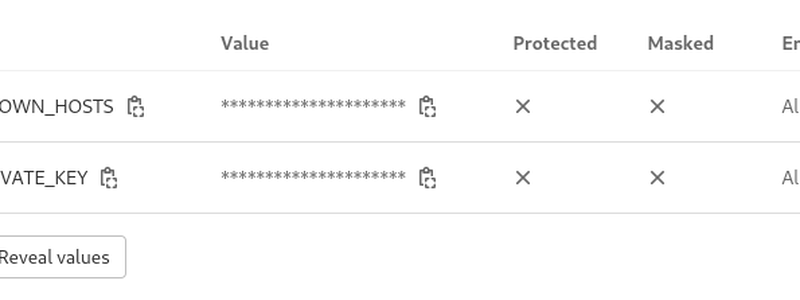
$SSH_KNOWN_HOSTS value can be obtained using ssh-keyscan command:
ssh-keyscan mywebsite.com
Basically we remove the public directory and upload the new one over SSH.
One stage Gitlab CI/CD
In fact it does not make sense for this CI/CD to have two stages. Then one stage is enough.
image: debian:buster-slim

buildanddeploy:
  variables:
    GIT_SUBMODULE_STRATEGY: recursive
  script:
    - apt-get update && apt install -qy wget openssh-client
    - wget -qO - https://github.com/getzola/zola/releases/download/v$ZOLA_VERSION/zola-v$ZOLA_VERSION-x86_64-unknown-linux-gnu.tar.gz | tar -zxvf -
    - ./zola build
    - eval $(ssh-agent -s)
    - echo "$SSH_PRIVATE_KEY" | tr -d '\r' | ssh-add -
    - mkdir -p ~/.ssh
    - chmod 700 ~/.ssh
    - echo "$SSH_KNOWN_HOSTS" >> ~/.ssh/known_hosts
    - ssh blog@zeph.one "rm -rf /home/blog/blog/public"
    - scp -r public/ blog@zeph.one:/home/blog/blog/
We even use a variable to store Zola version:
